Managers: Viewing a Direct Report’s Timesheet
View a Direct Report’s Timesheet
As a manager, you may want to occasionally review your direct report’s timesheets and time off information.
| NOTE: In emergency cases in which a staff member is unable to enter time and/or submit on their own behalf, a manager has the authority and ability to make those changes for a staff member. In such cases, the manager (or the team’s HA Generalist) should have written (preferred) or verbal communication from the staff member so as to accurately submit the appropriate hours. |

1. Type your direct reports name into the search bar and press “Enter.”
2. Next to your direct report’s name there will be a more button ( ). Click on this to reveal your options.
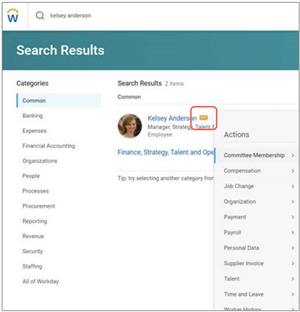
3. From here, select “Time and Leave” to review your direct report’s timesheets, time off balances, and much more.
4. To view a specific timesheet, choose “Enter Time.” From here, you will be able to select the week and direct report you’d like to view. Click “OK” when you are finished.

5. You will now be able to see your direct report’s timesheet and any hours or time off that has been entered.

Viewed 52 times