Coding Time to LEE Work
This item is archived and can no longer be modified. Please contact an administrator if you wish to unarchive this object.
When to Code Time to LEE
In regions that have selected a LEE customized national support option1 (either level 1 engagement or level 2 engagement), certain TFA staff members may also be considered LEE/TFA, "dual staff members." In addition to participating in LEE programming as a LEE member on their personal time, these "dual staff members" may also perform work for LEE as a "dual staff member" on their work time. You must certify all such work hours by recording your time for the Finance and Legal Affairs teams within Workday. Finally, if you're working on LEE matters under the direction of a LEE staff member, then you should code your LEE work time to the "LEE" time type in Workday.
How to Code Time to LEE
1. Log into Workday from any computer with internet access and navigate to the Time worklet.
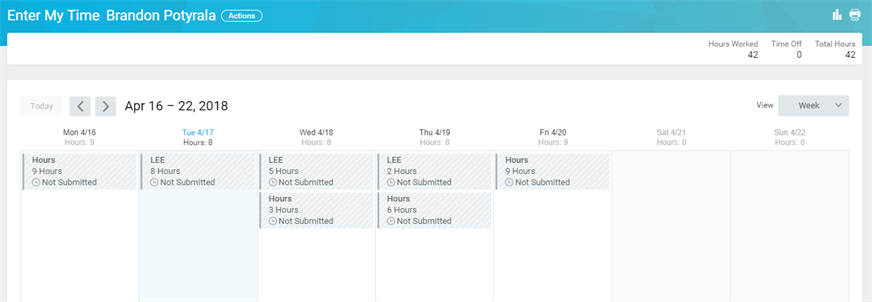
2. Once on the 'Time Entry' page begin entering hours as you normally.
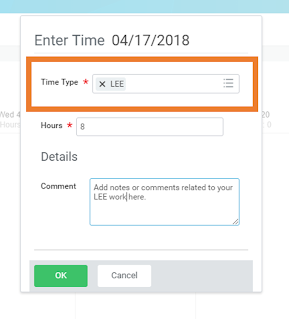
3. On the time entry form change the TIME TYPE from "Hours" to "LEE," and enter the number of hours you worked on this particular task. See below for more information on each field.
|  |


1 Regions that did not select a LEE CNS option may not partner with LEE regionally, though they can take advantage of National LEE resources. Staff members in these regions cannot be "dual staff," meaning they should not perform work for LEE, code any time to LEE, or communicate to their community through a LEE e-mail address.
Viewed 44 times